Next workshop Practical AI for small business: master the essentials and save a day a week, in 3 hours. Clare, date to come. Register now for the $97 early bird.
All skills

Free Claude skill · you create it yourself

The Whiteboard.

When you've got a lot of clients or projects on the go, the hard part isn't the work. It's remembering what the next thing is for each of them, and spotting the one that's slipping before the client has to chase you. I wanted a single place I could look at for a minute and know I was across everything. So I got Claude to keep a whiteboard.

This is a skill you create yourself. It has to know your business, so there's nothing to download. You paste the set-up prompt and Claude builds the skill for you.

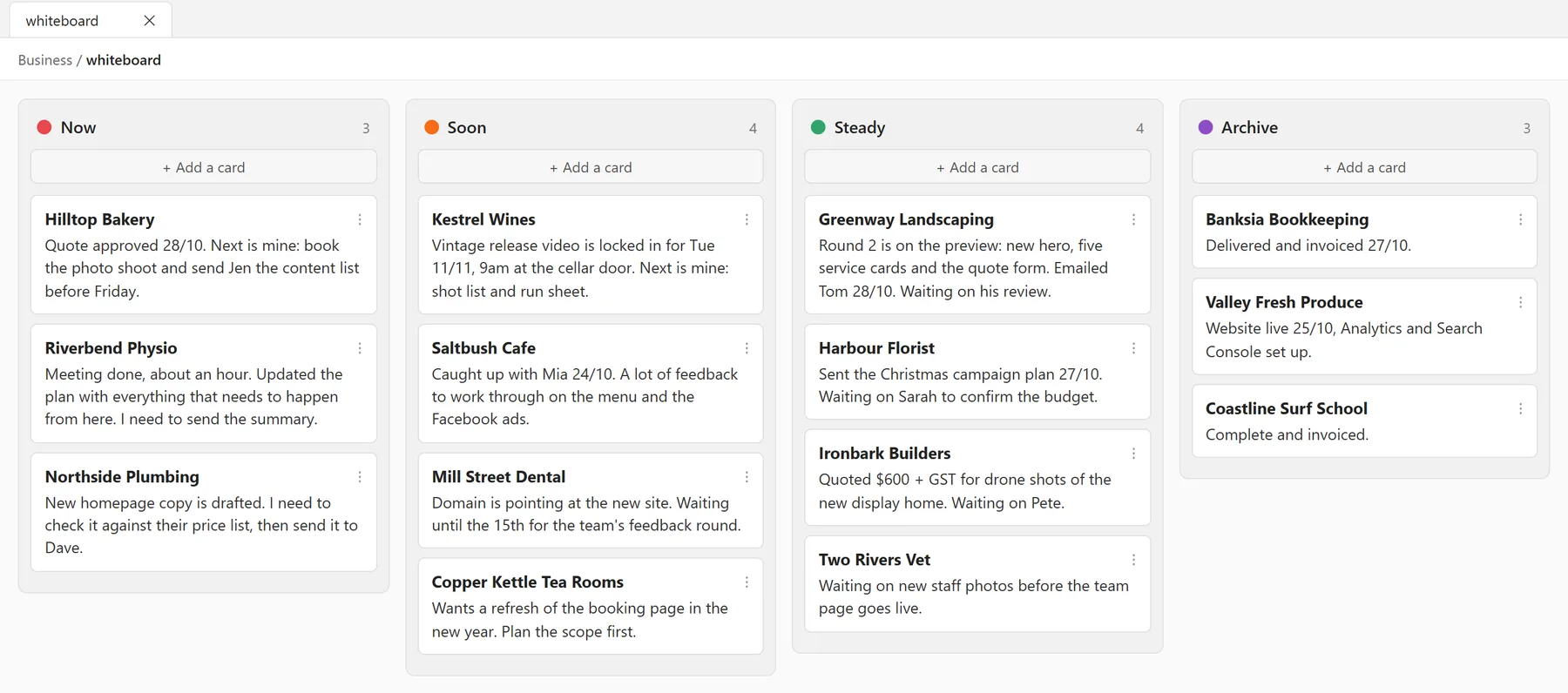
A whiteboard in Obsidian with four columns, Now, Soon, Steady and Archive, and a card for each client showing the next step. The businesses are made up.
The whiteboard in Obsidian, using the Kanban view. This is what mine looks like, but I've changed the clients' names and cards so you can get an idea without seeing their business.

Before you start

Get these ready first

  1. Get the Claude desktop app from claude.ai/download and sign in. The whiteboard uses Cowork, which is in the desktop app on paid plans. In Settings, then Capabilities, make sure Code execution and file creation is switched on. Claude needs it to create skills.
  2. Download Obsidian from obsidian.md. It's free. When it opens, click Create new vault, call it something like "Business" and choose where to save it. A vault is just a folder of notes.
  3. Add the Kanban plugin. In Obsidian, open Settings, then Community plugins. Click Turn on community plugins, then Browse, search for "Kanban", and click Install, then Enable.

Create the skill

You do this once

Open Cowork in the Claude desktop app, choose your Obsidian vault as the folder to work in, and paste this. Then answer its questions.

I want you to keep a whiteboard for my business: one place that shows the next step for every client and project, so I can look at it for a minute and know I'm across everything. First, ask me about my current clients and projects and where each one is up to. Ask a few questions at a time. Then build the board. Give each client one card: their name in bold, then a line or two on where we got to and the next step, or what's holding it up. Keep it short. Sort the cards into four columns, so the column shows how urgent it is: - Now: I need to do something this week - Soon: it's mine, but it can wait a week or two - Steady: it's with the client and I'm waiting on them - Archive: finished Save it as a file called whiteboard.md in this folder, laid out so the Obsidian Kanban plugin shows it as a board. Then turn these instructions into a skill called Whiteboard and save it. The skill should say where whiteboard.md lives, so that whenever I say "update the whiteboard" in any chat, you rewrite the card for whatever we've just worked on so it's true, and move it to the right column. Ask me before you move anything to Archive.

Use it

Any time

Update the whiteboard.

How it works

The whiteboard has one card for each client. Each card is short: where we got to, and the next step or what’s holding it up. The column it sits in tells you how urgent it is:

  • Now. I need to do something this week.
  • Soon. It’s mine, but it can wait a week or two.
  • Steady. It’s with the client. I’m waiting on them.
  • Archive. Finished.

I scan Now first, and that’s my week. Steady tells me who I’m waiting on and who might need a nudge. Anything that’s done goes to Archive, so the board only ever shows what’s live.

What makes it work is that I don’t keep it up to date. Claude does. Any time I work on a client’s project, whether that’s sending an email, delivering a file or booking a meeting, I finish by saying “update the whiteboard”. Claude rewrites that client’s card and moves it to the right column. It asks me before archiving anything, so nothing disappears without my say-so.

I never ask Claude what’s on the whiteboard. I just look at it.

Don’t want Obsidian?

Skip it. The whiteboard is a plain text file, so you can open it in any text editor and read it as a list of cards under four headings. Obsidian just shows the same file as a board, which is quicker to scan. I use Obsidian.

Using it

Any time you work on a client or a project, finish with:

Update the whiteboard.

That’s all. Because it’s a skill, it works in any chat, and Claude knows what you’ve just done, so it knows which card to change.

The whiteboard shows the next step for every client. When you want the full story on one of them, that’s what The Current State is for.